AI Image Restoration: Repair Old & Damaged Photos With AI (April 2026)
2026-04-06
In April 2026, AI image restoration has evolved from a niche archival tool into essential technology for anyone with a camera roll, a family album, or a box of fading prints. The AI photo restoration market is now tracked by multiple dedicated industry reports — with major players including Tencent, Adobe, Remini, NVIDIA, and Topaz Labs competing across color restoration, content restoration, and commercial photography segments. The broader AI image enhancer market grew from $2.45 billion in 2025 to $2.83 billion in 2026 at a 15.7% CAGR, with high-resolution image restoration identified as one of the five major trends driving the market forward.
But here's what most people discover after uploading their first damaged photo to a one-click restoration tool: the AI can make it look clean without making it look right. As Forever Studios documented in April 2026, "the average AI system in 2026 can cleanly generate a representation of what something should look like in general, but it can't know what's right for your specific image. It doesn't have your history. It doesn't have your context." The restored face looks sharp, vibrant, technically better — and still wrong. Because it no longer looks like the person you remember.
Jenova solves this with a fundamentally different approach: specialized AI agents that understand the domain-specific requirements of different restoration tasks, combined with conversational refinement that keeps you in creative control. The Photo Editor handles professional restoration and retouching. The Cosmetic Surgery Image Specialist provides clinical-grade facial analysis for precise face reconstruction. The Real Estate Image Editor restores and enhances property visuals. The Graphic Designer repairs brand and marketing assets across every format.
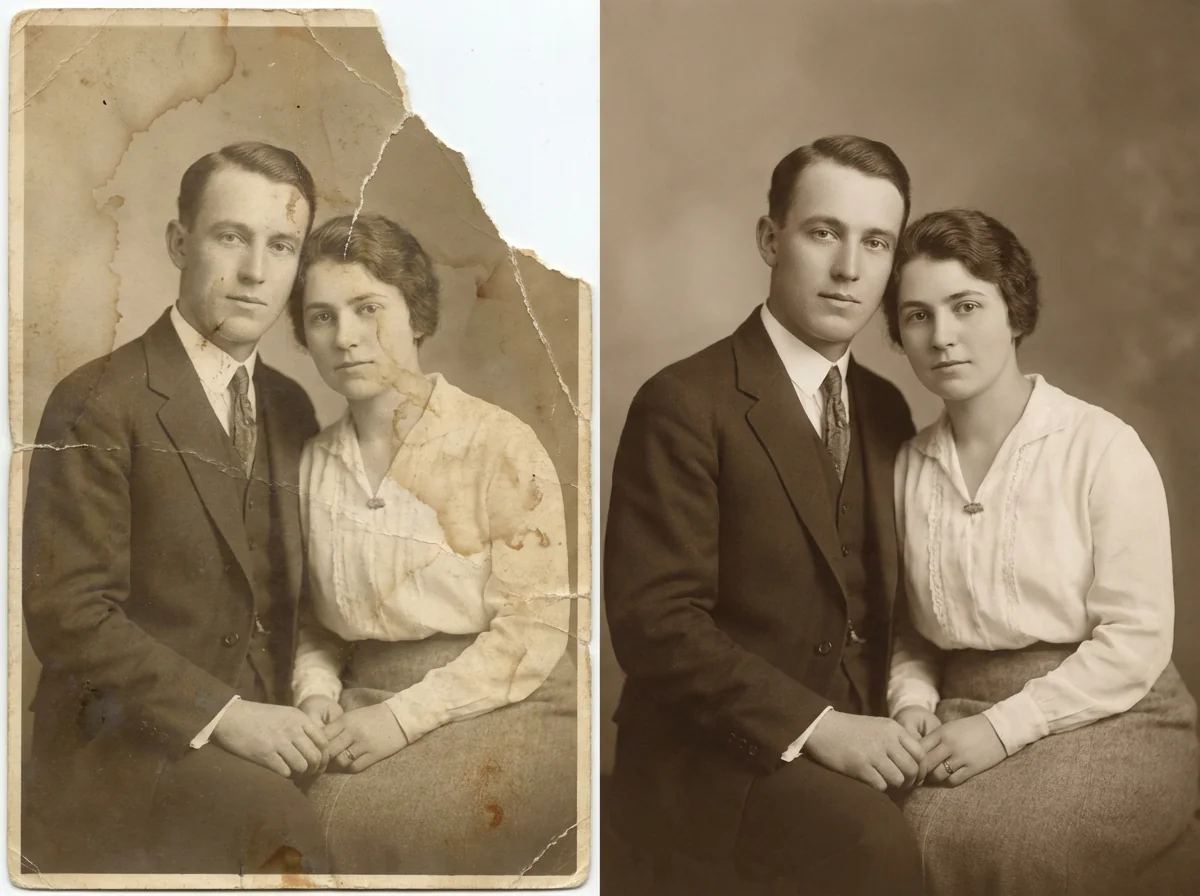
Quick Answer: What Is AI Image Restoration?
AI image restoration uses deep learning to repair, recover, and enhance damaged, faded, or degraded photographs — removing scratches, tears, stains, and noise while reconstructing missing detail, correcting color, and sharpening blurred areas. In 2026, the best AI image restoration goes beyond one-click fixes to offer domain-aware, iterative repair through natural language conversation.
- Professional photo restoration — Photo Editor handles scratch removal, color correction, face recovery, and old photo repair
- Facial reconstruction & analysis — Cosmetic Surgery Image Specialist provides clinical-grade facial proportion analysis for precise face restoration
- Real estate image repair — Real Estate Image Editor corrects lighting, replaces skies, and virtually stages damaged listing photos
- Marketing visual restoration — Marketing Visual Designer repairs and enhances campaign imagery across platforms
The Problem With Generic AI Image Restoration
The AI photo restoration market is now large enough to warrant dedicated 207-page industry reports tracking revenue across color restoration, content restoration, commercial photography, cultural heritage archive restoration, and personal use segments. But rapid growth has flooded the market with one-click tools that create a specific, predictable set of problems — problems that matter deeply when the photo is irreplaceable.
AI Invents What It Doesn't Know
"The average AI system in 2026 can cleanly generate a representation of what something should look like in general, but it can't know what's right for your specific image. It doesn't have your history. It doesn't have your context." — Forever Studios, April 2026
When an AI encounters a damaged face, a torn section, or a faded detail, it doesn't pause to assess what's actually missing. It predicts. Facial features are normalized toward statistical averages. Missing sections are filled with plausible-looking but fabricated content. As Forever Studios documented, "without clear references for the small details that make a person look right, the end result can be pretty uncanny looking." The restored image may look technically better — but if it was your mother or grandmother, the fact that it no longer appears to be the same person is a significant problem.
Over-Editing Destroys Authenticity
As Clipping World documented in their analysis of the 10 most common photo restoration mistakes, "faces can look too smooth or like cartoons" when AI filters are overused. The most damaging errors include excessive noise reduction that makes skin look plastic, incorrect color correction that produces unnatural tones, and cloning over facial features that erases defining characteristics. The fundamental problem: AI doesn't understand the difference between a distracting scratch and a defining freckle.
No Feedback Loop
The standard AI restoration workflow is upload → process → download. There's no conversation. No way to say "my grandfather's eyes were blue, not brown." No way to guide the AI toward what's correct rather than what's statistically probable. As Forever Studios noted, "if all you get is an upload form and a download link, you're not getting professional photo restoration — you're just outsourcing hope." The best restoration work is iterative and collaborative — and most AI tools offer neither.
Tool Fragmentation and Hidden Costs
The AI image restoration landscape in 2026 is fragmented across dozens of specialized tools — LetsEnhance for upscaling ($9/month), HitPaw for desktop restoration ($29.99/month), MyHeritage for colorization ($7.83/month), and Picsart for quick fixes ($5/month). Each handles one piece of the restoration puzzle. Restoring a single badly damaged photo might require scratch removal in one tool, face enhancement in another, colorization in a third, and upscaling in a fourth — each with separate subscriptions, different interfaces, and inconsistent quality.
The Jenova Solution: Domain-Expert AI Agents for Image Restoration
Instead of applying one generic restoration algorithm to every damaged image, Jenova provides specialized AI agents — each with deep understanding of the visual conventions, quality standards, and common failure modes of their specific domain.
| Challenge | Generic AI Restoration Tools | Jenova's Agent Approach |
|---|---|---|
| Facial hallucination | Invents features based on statistical averages | Domain-aware agents preserve authentic facial structure |
| Over-editing | Uniform processing destroys natural texture | Agents understand what to preserve vs. what to repair |
| No feedback loop | Upload → download, no conversation | Conversational editing with full context memory |
| Tool fragmentation | Separate apps for each restoration step | Complete restoration workflow in one conversation |
| Model flexibility | Locked to one AI model | Multiple frontier models (GPT-5.4, Claude Opus 4.6, Gemini 3.1 Pro Preview) |
| Historical accuracy | Mixes modern visual priors into old photos | Agents understand era-appropriate restoration |
📸 Professional Photo Restoration
The Photo Editor provides professional restoration for damaged, faded, and degraded photographs — understanding the critical difference between damage that should be repaired and detail that should be preserved. Unlike one-click tools that apply uniform processing, it understands scratch removal, color correction, noise reduction, face recovery, and detail reconstruction at a professional level. Conversational refinement means you describe what you want — and what you want kept — in natural language.
👤 Facial Reconstruction and Analysis
The Cosmetic Surgery Image Specialist provides clinical-grade facial photo analysis with quantified facial proportions, procedure mock-ups, and before/after layout formatting. For restoration projects where facial accuracy is critical — reconstructing a damaged face from a torn photo, ensuring restored features match the subject's actual appearance — this agent understands facial anatomy, not just pixel patterns.
🏠 Real Estate and Architectural Image Repair
The Real Estate Image Editor handles the specific challenges of property photography: sky replacement for overcast exteriors, virtual staging of empty rooms, lighting correction, and decluttering — all with MLS-ready output featuring matched lighting, accurate shadows, and correct furniture scale.
🎨 Marketing and Brand Visual Restoration
The Graphic Designer handles branding, social media graphics, marketing materials, print design, and illustrations — restoring and enhancing visuals while maintaining brand consistency. The Marketing Visual Designer creates and repairs campaign-ready assets with understanding of visual hierarchy and platform-specific formatting.
This is exactly what Jenova was built for — specialized depth where generic tools fall short. Try any visual agent free — no credit card required.
Specialized AI Agents for Image Restoration
Photo Editor
Professional restoration, retouching, and enhancement for damaged, faded, and degraded photographs — with domain-aware processing that preserves authentic detail.
- Scratch removal, tear repair, stain elimination, and noise reduction without destroying original texture
- Color correction and colorization that respects era-appropriate tones and lighting
- Iterative refinement through natural language — describe what you want restored, not which slider to move
Cosmetic Surgery Image Specialist
Clinical-grade facial photo analysis and reconstruction built on aesthetic medicine methodology.
- Facial proportion quantification: golden ratio, nasal projection, periorbital evaluation, aging pattern mapping
- Procedure mock-ups and before/after layout formatting for professional presentations
- Post-op healing tracking with complication flagging
Real Estate Image Editor
Virtual staging, renovation visualization, and listing photo restoration built for the real estate industry's specific requirements.
- Virtual staging in 8+ design styles with matched lighting and accurate furniture scale
- Sky replacement, twilight conversions, seasonal transformations, and decluttering
- MLS-ready output quality that meets listing platform standards
Marketing Visual Designer
Campaign-ready visual restoration and creation for logos, social media imagery, digital ads, and brand collateral.
- Platform-optimized visuals for Instagram, LinkedIn, Facebook, and display ads
- Brand guideline consistency across campaigns with persistent memory
- Multiple variations for A/B testing generated in minutes
Graphic Designer
Versatile visual restoration and design across branding, social media, marketing, print, infographics, and illustrations.
- Shifts between styles while maintaining professional standards
- Handles everything from business cards to large-format print materials
- Understands typography, layout, and visual hierarchy conventions
How It Works: From Damaged Photo to Restored Memory
The key shift in AI image restoration in 2026 is that the best results come from collaboration, not automation. As Forever Studios documented, "the real challenge isn't removing damage. It's avoiding the introduction of something that doesn't belong." Jenova's agents are built for exactly this — you provide the context and creative direction, the agent handles the technical execution.
1. Choose the right specialist. Browse Jenova's agent gallery and select the agent that matches your task — old photo restoration, face reconstruction, real estate enhancement, or marketing visual repair.
2. Upload and describe the damage and your goal. Use natural language to explain what needs restoring and what matters most. The agent understands context, not just pixels:
"This is a 1960s wedding photo of my grandparents. There are deep scratches across the bride's face, the colors have faded to a yellow-brown cast, and the bottom-right corner is torn off. I need to restore it for a 60th anniversary print. Preserve the era-appropriate warmth — don't make it look modern. My grandmother had blue eyes and dark brown hair."
3. Iterate conversationally. Unlike upload-download-reupload workflows, Jenova agents remember your full conversation. Refine with natural language:
"The scratch removal looks great, but my grandmother's restored face looks slightly too symmetrical — she had a distinctive smile that pulled slightly to the left. Can you adjust that? Also, the blue eyes are too bright — they should be a softer, grayer blue."
4. Apply domain-specific expertise. Each agent brings specialized knowledge. The Photo Editor understands the difference between film grain (preserve it) and digital noise (remove it). It knows that a 1960s photograph should have different color characteristics than a 1990s snapshot. It recognizes that a torn corner needs reconstruction that matches the surrounding texture, not a generic fill.
5. Build persistent preferences. Jenova's cross-session memory means your restoration standards, color preferences, and quality expectations carry forward. The next time you need a photo restored, the agent already knows your requirements — no re-explaining your style.
Results & Use Cases
📊 Family Photo Album Restoration
Scenario: A family wants to restore 50 photos from a water-damaged album — faded colors, mold spots, scratches, torn edges, and blurred faces — for a reunion celebration and archival preservation.
Traditional approach: Find a professional photo restoration specialist. Cost: $50-$200 per image. Timeline: 2-4 weeks. Total: $2,500-$10,000.
Jenova solution: Use the Photo Editor to restore each image with domain-aware processing that understands the specific challenges of old photo restoration. Unlike generic tools that blend modern visual priors into historical images, conversational refinement lets you guide the restoration: preserve the warmth of the original era while clarifying faces and removing damage. Persistent memory ensures consistent restoration style across the entire album. As a comprehensive analysis of AI image tools documented, AI-powered restoration now delivers 95% time savings compared to manual retouching — making professional-quality results accessible for entire family collections.
💼 Cultural Heritage and Archive Restoration
Scenario: A museum needs to digitally restore 200 archival photographs from the early 20th century — faded, scratched, and degraded — for a historical exhibition and online collection.
Traditional approach: Commission professional archival restoration. Cost: $100-$500 per image. Timeline: 2-3 months. Total: $20,000-$100,000.
Jenova solution: The Photo Editor handles archival restoration with understanding of era-appropriate visual characteristics. The Global AI Photo Restoration Market report identifies cultural heritage archive restoration as a dedicated market segment — because archival work requires different standards than personal photo fixing. Conversational refinement ensures each image is restored faithfully to its historical period, not modernized. Persistent memory maintains consistent treatment across the entire collection.
📱 E-Commerce Product Image Recovery
Scenario: An online retailer needs to restore and enhance 300 product images from an older catalog — low resolution, inconsistent lighting, color accuracy issues — to meet updated marketplace standards.
Traditional approach: Re-photograph all products. Timeline: 2-3 weeks. Cost: $5,000-$15,000+ for studio time.
Jenova solution: The Photo Editor restores each image with domain-aware processing that preserves material texture — exactly the failure mode that generic tools get wrong on fabric, metallic finishes, and transparent objects. The Graphic Designer adapts restored images for different marketplace specifications. As industry analysis documented, AI-powered image tools deliver 50-80% cost reduction versus traditional photography while achieving 20-40% improvement in conversion rates.
🏠 Real Estate Listing Photo Enhancement
Scenario: A real estate agent needs to restore and enhance listing photos for 20 properties — correcting overcast skies, poor interior lighting, cluttered rooms, and unfurnished spaces.
Traditional approach: Hire a virtual staging company at $100-$300 per room. Wait 24-48 hours per listing.
Jenova solution: The Real Estate Image Editor provides sky replacement, virtual staging, twilight conversions, decluttering, and lighting correction — all with MLS-ready output quality. Results in minutes, with persistent memory of your preferred staging styles across listings. Real estate listings using AI-enhanced images boost sales by an estimated 20%.
🔬 Facial Reconstruction for Damaged Portraits
Scenario: A family needs to reconstruct a severely damaged portrait — the subject's face is partially torn away — using reference photos from the same era.
Traditional approach: Commission a professional restoration artist. Cost: $200-$500+. Timeline: 1-2 weeks.
Jenova solution: The Photo Editor handles the initial restoration — scratch removal, color correction, background repair. The Cosmetic Surgery Image Specialist provides clinical-grade facial proportion analysis to ensure the reconstructed face matches the subject's actual bone structure and features — not a statistically averaged face. Conversational refinement lets the family provide context: "Her chin was more pointed than that" or "His eyebrows were thicker." This is the collaborative process that Forever Studios identified as essential — translating emotional understanding into accurate visual results.
Competitor Comparison: Where Jenova Differs
While standalone restoration tools like Remini, LetsEnhance, and HitPaw offer strong single-purpose capabilities, they approach image restoration as a one-click operation rather than a collaborative process. As LetsEnhance's own 2026 comparison documented, each tool has significant limitations: HitPaw requires a desktop download and starts at $29.99/month for 100 credits. MyHeritage requires multiple separate steps (Colorize, Enhance, Repair) instead of unified restoration. Picsart delivers results that "often look artificial." And even LetsEnhance acknowledges that "each run is slightly different, sometimes it's worth running the same photo again to get the version you prefer."
Jenova's advantage is specialization with unified access. Each visual agent carries deep domain knowledge — a photo editor that understands the difference between film grain and digital noise, a cosmetic specialist that quantifies facial proportions rather than guessing, a real estate editor that produces MLS-compliant output. And because Jenova provides access to multiple frontier models (GPT-5.4, Claude Opus 4.6, Gemini 3.1 Pro Preview, plus models from xAI and DeepSeek), you're never locked into one model's limitations. Persistent cross-session memory means your restoration standards carry forward automatically — something no standalone restoration tool offers. Most critically, Jenova's conversational approach provides the feedback loop that Forever Studios identified as the missing piece in AI restoration: the ability to say "that doesn't look like her" and have the AI actually adjust.
FAQ
How does AI image restoration work in 2026?
AI image restoration uses deep learning models trained on millions of images to detect and repair damage patterns — scratches, tears, stains, fading, noise, and blur — while reconstructing missing detail using convolutional neural networks (CNNs) for damage detection and generative adversarial networks (GANs) for realistic reconstruction. Modern tools handle scratch removal, color correction, face enhancement, colorization, and resolution upscaling. Jenova's agents add domain expertise and conversational control on top of this — the Photo Editor understands which details to preserve versus repair based on the image type and your specific instructions.
Can AI image restoration make photos worse?
Yes. As Clipping World documented, the most common restoration mistakes include over-editing that makes faces look like cartoons, incorrect color correction that produces unnatural tones, excessive noise reduction that creates plastic-looking skin, and cloning over facial features that erases defining characteristics. Forever Studios confirmed that AI restoration can produce results that "look sharp, vibrant & technically better… and still be wrong." The fix isn't avoiding AI — it's using a tool that allows iterative refinement, which is why Jenova's conversational agents outperform one-click restoration tools.
What's the best AI image restoration tool for old family photos?
Old family photos require understanding historical context — era-appropriate color palettes, film grain characteristics, and the difference between damage to repair and authentic aging to preserve. Generic tools often blend modern visual priors into historical images, creating "temporally impossible" results. Jenova's Photo Editor handles old photo restoration through natural language conversation — you describe the era, the subject, and what matters most, with iterative refinement until the result feels right.
How much does Jenova cost for image restoration?
Jenova offers a free tier with all core features and limited usage. Paid plans start at $20/month (Plus) with 30× the usage of the free tier and custom model selection. Premium ($50/mo), Pro ($100/mo), and higher tiers scale usage further. Every visual agent — from the Photo Editor to the Cosmetic Surgery Image Specialist — is accessible on every plan.
How big is the AI image restoration market?
The AI photo restoration market is now tracked by dedicated industry reports covering revenue from 2021-2032 across color restoration, content restoration, and commercial/personal/cultural heritage segments. A conservative estimate places the global market at approximately $500 million in 2025 with a 20% CAGR](https://www.datainsightsmarket.com/reports/ai-photo-restoration-523480). The broader AI image enhancer market is valued at [$2.83 billion in 2026, projected to reach $5.03 billion by 2030, with high-resolution image restoration identified as a major growth trend.
What's the difference between Jenova and standalone AI image restoration tools?
Standalone tools like Remini, LetsEnhance, or HitPaw offer a single restoration capability — upload, process, download — with no feedback loop and no conversation. Jenova provides an ecosystem of specialized visual agents — each with domain expertise — plus multi-model access, persistent memory across sessions, tool integrations (Gmail, Drive, Notion), and conversational refinement. Image restoration becomes a collaborative process rather than a one-click gamble. It's the difference between a single button and a team of visual specialists who remember your preferences, understand your specific use case, and let you guide every decision.
Conclusion
AI image restoration in 2026 is a rapidly growing market driven by a universal need: everyone with a family album, an archive, or a camera roll has images that deserve to be saved. But as the industry has matured, the limitations of generic, one-click restoration have become painfully clear. As Forever Studios documented, "a restoration can look sharp, vibrant & technically better… and still be wrong" — because the real challenge isn't removing damage, it's avoiding the introduction of something that doesn't belong.
Jenova eliminates these failure modes with specialized AI agents that understand their domains deeply. The Photo Editor for professional restoration that preserves authentic detail and historical accuracy. The Cosmetic Surgery Image Specialist for clinical-grade facial reconstruction. The Real Estate Image Editor for MLS-ready listing enhancement. The Graphic Designer for brand-consistent visual repair. Each agent brings the expertise of a specialist, accessible through natural conversation, with persistent memory that learns your standards over time.
Try any visual agent now — explore the full agent library at Jenova.